Where the rate came from
Every figure shows the sales it came from, the market method, the regression check, and the range the data supports.

CompAdjuster
Site, GLA, below grade, baths, garage and pool, each derived from the comps you selected, checked against the range it came from, and exported with the methodology attached.
Works with your MLS export · Needs your comparable and land sales · Sample market included to try it on
Most adjustment support is either carried over from the last report or rebuilt in a spreadsheet on every assignment. Both work fine until someone asks to see the paired sales behind the number.
Every figure shows the sales it came from, the market method, the regression check, and the range the data supports.
Paired sales audits and a bracketing test show whether the adjustment tightens the range of adjusted comps or just shifts it.
A support exhibit written while you work, instead of pieced together weeks later when a revision request comes in.
One assignment from start to export takes about as long as building the grid by hand. The figures below are from the sample market included with the app, so you can open it and follow along.
Enter the subject and the app gives you search ranges to paste into your MLS, so the export comes back in the right shape.
Suggested search ranges
| GLA | 1,354 – 2,030 |
| Contract | $349,183 – $523,775 |
| Year | 2015 – 2035 |
| Land | 6,621 – 9,931 sf |
Saved reports reopen with every figure intact, so a revision request takes five minutes.
Every other adjustment rests on the site rate, so it comes first, reconciled from your land sales with the checks behind it on screen. Override it whenever your judgment says to. Without land sales it won't produce rates. It won't assume a lot-to-value ratio and stack five adjustments on top of it.
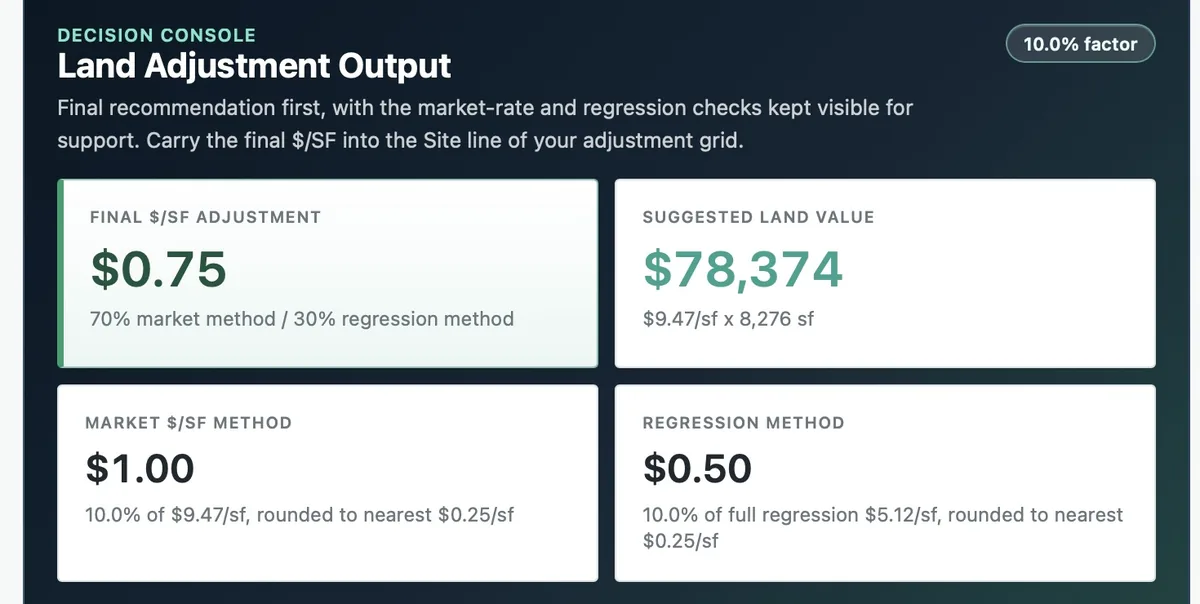
Import one export or several. Uncheck a sale and every rate updates, so you can see how much weight any one comp was carrying.
Comparable set
| Comparable 1 | $429,029 |
| Comparable 2 | $403,900 |
| Comparable 3 | $485,471 |
| 3 more selected | · |
Leave actives and pendings in. They go into the grid with their own checkbox, and asking prices never go into a derived rate.
Each rate is reconciled from the comps you selected and goes straight into the matching line of your grid. The methodology paragraph is written from the figures on the page.

One exhibit for the report and one package for the workfile. Each download tells you what's in it and how many pages it runs before you open it.
The handoff
| For the appraisal report | Report exhibit .pdf |
| For your workfile | Workfile package .zip |
| Full support report | .pdf, when you want it |
The workfile package holds both PDFs, the source CSV and the paired sales audits.
It's all written the day you do the work, so you're not piecing it together months later from a spreadsheet you don't remember building.
You reconcile each rate, and the file records how you got there.
Site from vacant lot sales, with the implied full land rate alongside. Living area bracketed against paired sales. Below grade finished and unfinished from the same set. Baths per full bath with half baths at 50%, and garage per attached space.
Reports are saved to your account, so a revision weeks later reopens with its subject, land sales, comps and reconciled adjustments intact.
No. It derives an indicated adjustment from the sales you give it and shows the data behind it. You reconcile it, change it or throw it out. The conclusion in the report is yours, and the exhibit shows how you got there.
Common layouts are recognized automatically. If a required column is missing, the app tells you which one instead of failing quietly. If your board's export is unusual, send it over and we'll add it.
For anything with a lot, yes. Every physical rate comes from what's left of the sale price after the site value comes out, so a guessed site value puts the same error into GLA, below grade, baths and garage at once. The app won't assume a lot-to-value ratio to get you past that step. Vacant lot sales are the usual source, and they don't have to be as recent as your comps.
Yes. Bring them in with the sold export and they go into the grid with their own checkbox, shown at list price. They never go into a derived rate. A list price is the seller's opinion, so it stays out of the math behind GLA, below grade, baths and garage. If a file turns out to hold nothing but listings, the app tells you.
Yes. A condo has no separate site value, so the whole sale price is the residual and the app doesn't deduct a lot that isn't there. You set the property type on the first step, and a condo assignment skips the land analysis.
No. It doesn't fill out a URAR and won't. It works out the rates and writes the support. You enter the concluded figures on the grid in the forms software you already use, whether that's TOTAL, ACI, ClickForms or Aivre. It works alongside that software.
The redesigned UAD 3.6 report doesn't change that. Whatever forms software you use, the new report asks for more visible support behind each rate, not a different way to derive it. The rates still have to come from your own market, and that's what this does.
No. They're sold separately and neither depends on the other. They take different exports and answer different questions: time adjustments versus physical ones. Most people who start with one add the other later.
Your uploads are processed for your analysis, and your saved reports are stored in your own account so you can open them on any computer. Your data isn't sold and isn't pooled into anyone else's analysis.
No. The analysis is math you can follow: medians, paired sales tests, a chain-linked index and a regression check, all run on the sales you provide. Nothing is guessing at a number, because an adjustment you can't explain isn't support.
See also UAD 3.6 support.
Per appraiser. Every plan starts with 14 days free. Nothing's charged before day 14, and you can cancel anytime from your account page.
Complete adjustment support
or $699/year · $9 a month less than both separately
Notify meAt $69 a month, Professional costs about what 40 minutes of an appraiser's time is worth. That's 40 minutes a month, not per report. Run your own numbers.
More than one appraiser in the office? Tell us how many and we'll price it for your office.
AppraiserBench opens to all appraisers on October 1. Leave your email and we'll send you the link that morning.
Prefer email? [email protected]