Market conditions
MarketAdjuster
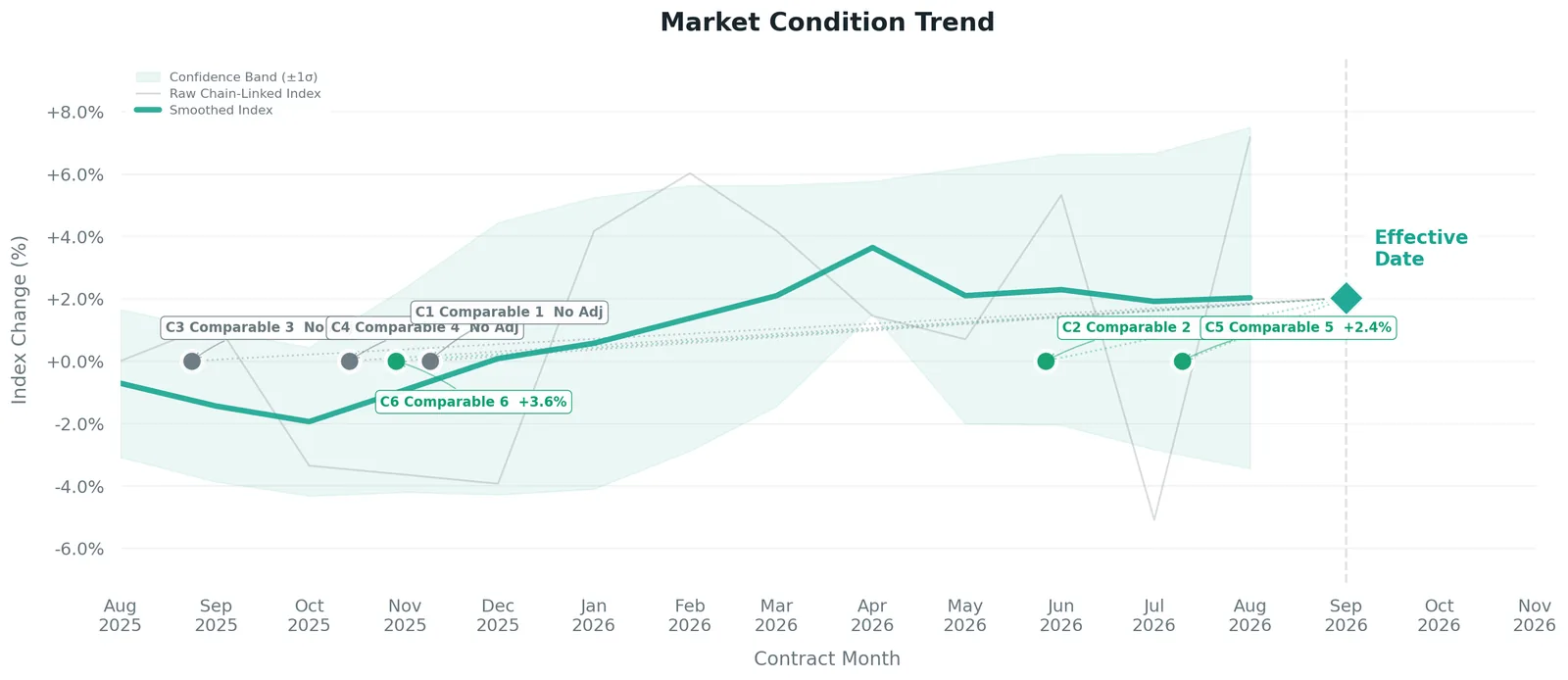
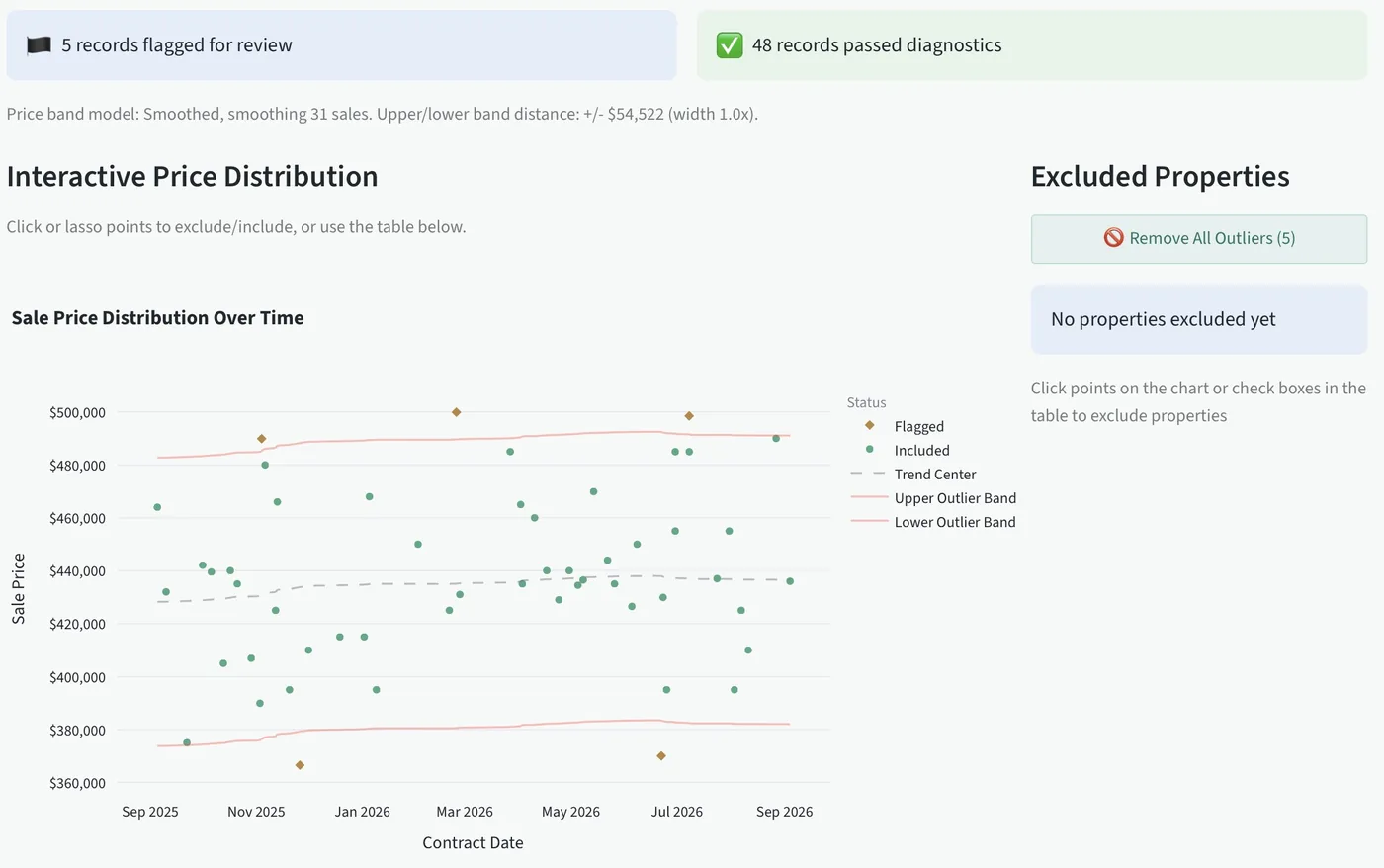
Load the closed sales from your competitive market. It builds a chain-linked index, flags outliers for you to decide on, and adjusts each comp from its own contract date instead of applying one rate to all of them.

Opens October 1 · 14 days free on every plan
Market conditions and physical adjustments, derived from your own sales, with the support written up while you work.
Built by a working appraiser · Works with your MLS export · 14 days free on every plan
The arithmetic
Sort the export, test the pairs, rebuild the spreadsheet, write up the support. You do it on every assignment, whether or not the market has moved since the last one.
Four months later a reviewer asks where the $95 came from, and you don't remember the assignment. If the support is in the workfile, that's a one-minute answer. If it isn't, you lose an evening rebuilding it.
There are two tools because each one takes a different export and answers a different question. Between them they cover every line of the grid.
Market conditions
Load the closed sales from your competitive market. It builds a chain-linked index, flags outliers for you to decide on, and adjusts each comp from its own contract date instead of applying one rate to all of them.
Physical adjustments
Load your comparable sales and land sales. It pulls the lot value out of each sale, allocates what's left across the improvements, and reconciles a rate for each line you fill in: GLA, below grade, baths, garage and site.

You load one export and get reconciled rates with the evidence behind them. Both tools include a sample market, so you can try the whole process before you pull your own data.
Run the searches you'd run anyway. Column names don't have to match. If the app can't place a column, it asks you instead of guessing.
Outliers are flagged, never removed. Uncheck a sale and every rate updates, so you can see how much weight any one comp was carrying.
Every rate comes with the evidence behind it, and you can change any of them. What goes in the report is your conclusion.

You get two files: the exhibit for the report, and a workfile package with the source data and the audit trail. Both are dated the day you did the work.
When the data says no
An adjustment you can't support is worse than a documented zero, because the reviewer will ask and you won't have an answer. Here's what it won't do.
The trend is fitted across every closed sale, with a range around it. If that range includes zero change, the market is reported as stable. It won't give you a direction the data can't tell apart from flat.
It measures what buyers actually paid per dollar of seller credit. If there's no measurable effect, the finding is that no adjustment is indicated. That holds up better than a dollar-for-dollar deduction.
Comps inside your no-adjustment window, or under your minimum threshold, are reported as No Adj. You set both limits, and both are recorded.
Built for UAD 3.6
The redesigned URAR doesn't change how you derive an adjustment. It changes how visible the support has to be, in the market section and on every line of the grid. MarketAdjuster fills all 24 market fields from the export you already pulled, in the order the new form asks for them.
It's just as useful on a 2.6 report today, where the same figures still need support, and it covers the trend work the 1004MC asked for. What changes and what doesn't →
Per appraiser. Every plan starts with 14 days free. Nothing's charged before day 14, and you can cancel anytime from your account page.
Complete adjustment support
or $699/year · $9 a month less than both separately
Notify meAt $69 a month, Professional costs about what 40 minutes of an appraiser's time is worth. That's 40 minutes a month, not per report. Run your own numbers.
More than one appraiser in the office? Tell us how many and we'll price it for your office.
No. It derives an indicated adjustment from the sales you give it and shows the data behind it. You reconcile it, change it or throw it out. The conclusion in the report is yours, and the exhibit shows how you got there.
The exhibit shows the data set, what was excluded, the method and the reasoning, so a reviewer can follow how you got the number instead of taking it on faith. MarketAdjuster's narrative cites Fannie Mae Selling Guide B4-1.3-09 on adjusting each comp from its own contract date. No software can promise a particular reviewer will accept a particular report.
No. It doesn't fill out a URAR and won't. It works out the rates and writes the support. You enter the concluded figures on the grid in the forms software you already use, whether that's TOTAL, ACI, ClickForms or Aivre. It works alongside that software.
The redesigned UAD 3.6 report doesn't change that. Whatever forms software you use, the new report asks for more visible support behind each rate, not a different way to derive it. The rates still have to come from your own market, and that's what this does.
It covers what the 1004MC asked for and more. The old form wanted median price, days on market and inventory over three periods. MarketAdjuster measures the trend across every closed sale, tests whether it can be separated from flat, and turns it into a rate applied to each comp from its own contract date. It also fills in the UAD 3.6 market section, which replaced the 1004MC.
Yes. Both tools include a sample market. One click loads a full set of sales (in CompAdjuster, the land sales and listings too), so you can run a report from start to finished exhibit without pulling an export or entering a subject. Everything works on the sample, including the controls that change a rate.
That depends on how you work now. If you rebuild a spreadsheet for every assignment, it saves most of that time. If you carry rates forward from old reports, the bigger benefit is having support ready when someone asks. The calculator above uses your numbers, so put in figures you believe.
Every plan starts with 14 days free. You add a card when you start so there's no interruption when the trial ends, and nothing is charged before day 14. Cancel before then from your account page and you pay nothing.
It tells you. A comp inside your no-adjustment window, or under your minimum threshold, is reported as no adjustment. A set of paired sales rates that are too far apart to treat as one indication isn't accepted as support. If the data doesn't support an adjustment, you want to know before a reviewer points it out.
More detail on CompAdjuster, MarketAdjuster and UAD 3.6.
AppraiserBench opens to all appraisers on October 1. Leave your email and we'll send you the link that morning.
Prefer email? [email protected]